
time_split#
Time-based k-fold validation splits for heterogeneous data.
Functions
|
Log iteration progress. |
|
Fold visualization. |
|
Create time-based cross-validation splits. |
- log_split_progress(splits: Sequence[DatetimeSplitBounds], *, logger: Logger | LoggerAdapter[Any] | str = 'time_split', start_level: int = 20, end_level: int = 20, extra: dict[str, Any] | None = None, get_metrics: Callable[[Timestamp], MetricsType] | None = None) LogSplitProgress[source]#
Log iteration progress.
- Parameters:
splits – Splits to iterate over.
logger – Logger or logger name to use.
start_level – Log level to use for the
fold-begin message.end_level – Log level to use for the
fold-end message.extra – Immutable, user-defined extra-arguments to use when logging, merged with progress-related extras (see
SplitProgressExtras).get_metrics – A callable
(training_date) -> fold_metrics | str(seetraining_date). If given, metrics are added to thefold-end message. The message is formatted using thedefault formatterunlessFORMAT_METRICSis set. If this callback returns astrargument, thedefault formatterwill assume that the metrics are pre-formatted, simply appending the formatted metrics to thefold-end messageas-is.
- Returns:
A
LogSplitProgressobject.
Examples
Configuring the logger name and
fold-begin messagelog level.>>> from time_split import split, log_split_progress >>> schedule = ["2023-08-16", "2023-08-17 12", "2023-08-19"] >>> tracked_splits = log_split_progress( ... split(schedule), ... logger="progress", ... start_level=logging.DEBUG, ... ) >>> list(splits) [progress:DEBUG] Begin fold 1/2: '2023-08-09' <= [schedule: '2023-08-16' (Wednesday)] < '2023-08-17 12:00:00'. [progress:INFO] Finished fold 1/2 [schedule: '2023-08-16' (Wednesday)] after 5m 18s. [progress:DEBUG] Begin fold 2/2: '2023-08-10 12:00:00' <= [schedule: '2023-08-17 12:00:00' (Thursday)] < '2023-08-19'. [progress:INFO] Finished fold 2/2 [schedule: '2023-08-17 12:00:00' (Thursday)] after 4m 3s.
Using the get_metrics callback argument.
>>> metrics = {
...     "2023-08-16 00:00:00": {"rmse": {"train": 0.11, "test": 0.5}},
...     "2023-08-17 12:00:00": {"rmse": {"test": 0.5, "future": 20.19}},
... }
>>> tracked_splits = log_split_progress(
...     split(schedule),
...     get_metrics=lambda key: metrics[str(key)],
... )
>>> list(tracked_splits)
[time_split:INFO] Begin fold 1/2: '2023-08-09' <= [schedule: '2023-08-16' (Wednesday)] < '2023-08-17 12:00:00'.
[time_split:INFO] Finished fold 1/2 [schedule: '2023-08-16' (Wednesday)] after 5m 18s. Fold metrics:
rmse.train   0.11
rmse.test     0.5
[time_split:INFO] Begin fold 2/2: '2023-08-10 12:00:00' <= [schedule: '2023-08-17 12:00:00' (Thursday)] < '2023-08-19'.
[time_split:INFO] Finished fold 2/2 [schedule: '2023-08-17 12:00:00' (Thursday)] after 4m 3s. Fold metrics:
rmse.test       0.5
rmse.future   20.19
Formatting was done using the
default formatter, since theFORMAT_METRICSsetting isNone.
- plot(schedule: DatetimeIndex | Iterable[str | Timestamp | datetime | date | datetime64] | str | Timedelta | timedelta | timedelta64, *, before: int | Literal['all'] | str | Timedelta | timedelta | timedelta64 = '7d', after: int | Literal['all'] | str | Timedelta | timedelta | timedelta64 = 1, step: int = 1, n_splits: int = 0, available: Iterable[str | Timestamp | datetime | date | datetime64] | DataFrame | Series | None = None, expand_limits: bool | Literal['auto'] | str = 'auto', filter: Callable[[Timestamp, Timestamp, Timestamp], bool] | str | None = None, ignore_filters: bool = False, bar_labels: str | Literal['rows'] | list[tuple[str, str]] | bool = True, show_removed: bool = False, row_count_bin: str | Series | None = None, ax: Axes | None = None) Axes[source]#
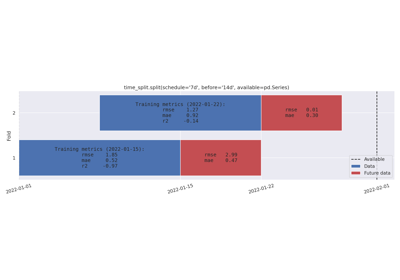
Fold visualization.
This function plots the folds and in-fold splits that would be made by passing the same arguments to the
split()-function.- Parameters:
schedule – A
DatetimeIterable, pandas offset alias, or cron expression.before – Range before schedule timestamps. Either a pandas offset alias, an integer (schedule-based offsets), or ‘all’ (requires available data).
after – Range after schedule timestamps. Either a pandas offset alias, an integer (schedule-based offsets), or ‘all’ (requires available data).
step – Select a subset of folds, preferring folds later in the schedule.
n_splits – Maximum number of folds, preferring folds later in the schedule.
available – Binds schedule to a range. If bar_labels is given but is not a
list, this data will be used to compute fold sizes.expand_limits – A pandas offset alias used to expand available data to its likely “true” limits. Pass
Falseto disable.filter – A callable
(start, mid, end) -> boolapplied to each fold. Strings are converted usingget_by_full_name().ignore_filters – Set to ignore filtering parameters (e.g. step and filter).
bar_labels – Labels to draw on the bars. If you pass a string, it will be interpreted as a time unit (see Offset aliases for valid frequency strings). Bars will show the number of units contained. Pass ‘rows’ to simply count the numbers of elements in data (if given). To write custom bar labels, pass a list
[(data_label, future_data_label), ...], one tuple for each fold. This may be used to write metric values per data set after cross validation.show_removed – If
True, splits removed by n_splits or step are included in the figure.row_count_bin – A pandas offset alias. If given, show normalized row count per row_count_bin in the background. Pass
pandas.Seriesto use pre-computed row counts.ax – Axis to use for plotting. If
None, create new axes.
For more information about the schedule, before/after and expand_limits-arguments, see the User guide.
- Returns:
Matplitlib axes.
- Raises:
ValueError – For invalid plot/split argument combinations.
Examples
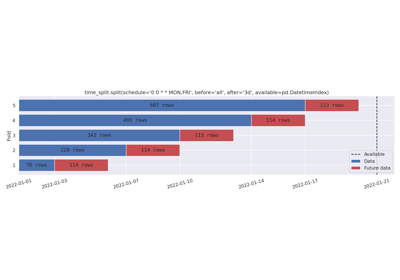
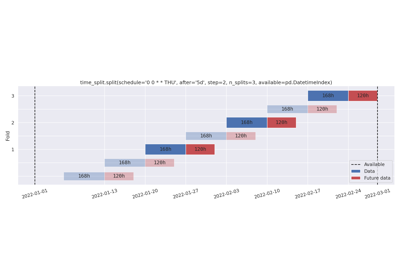
Cron schedule, keeping all data before the schedule.
Cron schedule, keeping all data before the schedule.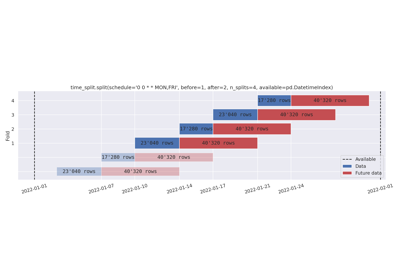
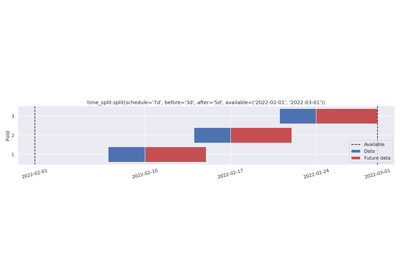
Removing folds with n_splits. Schedule-based before and after-data.
Removing folds with n_splits. Schedule-based before and after-data.
- split(schedule: DatetimeIndex | Iterable[str | Timestamp | datetime | date | datetime64] | str | Timedelta | timedelta | timedelta64, *, before: int | Literal['all'] | str | Timedelta | timedelta | timedelta64 = '7d', after: int | Literal['all'] | str | Timedelta | timedelta | timedelta64 = 1, step: int = 1, n_splits: int = 0, available: Iterable[str | Timestamp | datetime | date | datetime64] | None = None, expand_limits: bool | Literal['auto'] | str = 'auto', filter: Callable[[Timestamp, Timestamp, Timestamp], bool] | str | None = None, ignore_filters: bool = False) list[DatetimeSplitBounds][source]#
Create time-based cross-validation splits.
To visualize the folds, pass the same arguments to the
plot()-function.- Parameters:
schedule –
A
DatetimeIterable, pandas offset alias, or cron expression.before – Range before schedule timestamps. Either a pandas offset alias, an integer (schedule-based offsets), or ‘all’ (requires available data).
after – Range after schedule timestamps. Either a pandas offset alias, an integer (schedule-based offsets), or ‘all’ (requires available data).
step – Select a subset of folds, preferring folds later in the schedule.
n_splits – Maximum number of folds, preferring folds later in the schedule.
available – Binds schedule to a range. Passing a tuple
(min, max)is enough.expand_limits – A pandas offset alias used to expand available data to its likely “true” limits. Pass
Falseto disable.filter – A callable
(start, mid, end) -> boolapplied to each fold. Strings are converted usingget_by_full_name().ignore_filters – Set to ignore filtering parameters (e.g. step and filter).
For more information about the schedule, before/after and expand_limits-arguments, see the User guide.
- Returns:
A list of tuples
[(start, mid, end), ...].
Examples
Cron schedule, keeping all data before the schedule.
Cron schedule, keeping all data before the schedule.
Removing folds with n_splits. Schedule-based before and after-data.
Removing folds with n_splits. Schedule-based before and after-data.
Modules